


How to Watch and Record Demos in CS2

How to Watch and Record Demos in CS2
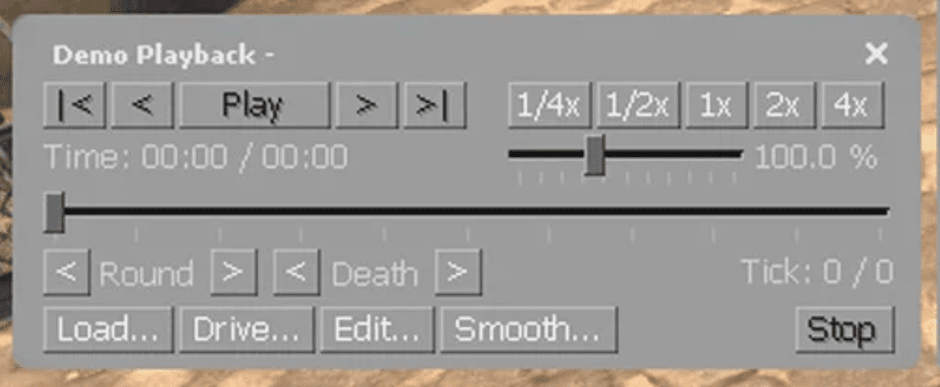
In CS2, a demo is an in-game match recording that allows you to analyze gameplay. How to watch demos CS2? To open playback panel, type the command
demoui
in the console. For convenience, you can bind it to a key, for example:
bind "l" "demoui"
.
With the panel, you can rewind, change playback speed, and switch between players. To record your own match, use the command
record filename
, and to stop —
stop
. To load a demo, open
demoui
, click Load, select the file, and click Open.

If you see a black screen during playback, try pausing and playing again, or lower your resolution settings.

Useful Tips

For comfortable demo analysis, use CS2 configs optimized for your system — this helps ensure stable FPS. And don’t forget the visual side: CS2 case openings also improve your in-game focus and enjoyment.

Other articles
Our choice
Chicken.GG
Chicken.GG
9.3/10
4 games
Cards
Cryptocurrency
Gift Cards
+2

CS2SKIN
CS2SKIN
9.5/10
7 games
Cryptocurrency
Cards
ApplePay
+2
CSSPOT
+100% to Deposit
until 21.12.2026
Caser
Caser
9.1/10
5 games
SBP
Cryptocurrency
GG.SKIN
+2