When you're just starting out in CS2, the radar might seem unimportant. But as your skill level grows, you'll start noticing every detail — and proper radar settings become a key to success.
In CS2, basic radar options can be found under Settings → Game Settings. Here, you can adjust:
Radar size — how much space it takes on your screen
Rotation — whether the radar rotates with your movement
Zoom — how much of the map is visible
TAB map shape — shows the map as a full square when checking stats
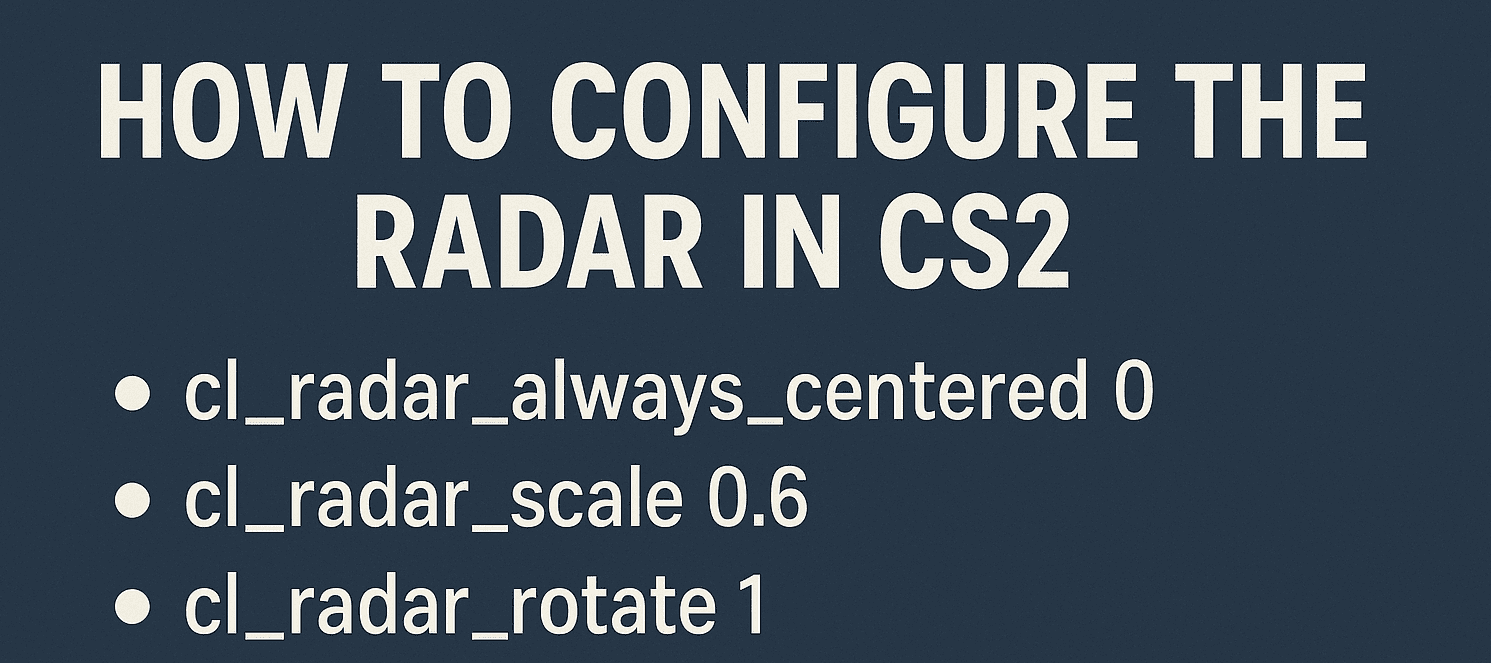
Advanced customization is also available through console commands:
Fine-tuning your radar — just like adjusting CS2 crosshairs — is crucial for map awareness and team coordination. Even pros like b1t take these settings seriously.
Want to keep up with interface updates, new features, CS2 case drops, or trending crosshairs? Visit CSSPot, your trusted guide to finding the best case sites, popular pro settings, and the latest trends. With CSSPot, you’re always one step ahead.
An analyst, amateur commentator, and author of platform reviews and guides on CSSpot. In his articles, Mikhail draws on his many years of experience watching and analyzing professional-level games.