
OpenStars
OpenStars
OpenStars
8.9/10
Payment methods
Cards
Cards
Cryptocurrency
Cryptocurrency
Gift Cards
Gift Cards
SBP
SBP
Games on the website
Cases
Case Battles
Upgrades
Contracts

OpenStars – CS2 Case Opening, Rewards and Skin Withdrawals

OpenStars is a CS case opening site built around paid case openings, free demo spins, daily free cases, case battles, contracts, skin upgrades, rewards, and Steam withdrawals. Players can register through Steam, email, or Google, then top up a balance and choose cases by price, theme, or available funds. The site also lets users sell received items for account funds, use those funds in other modes, or select skins for withdrawal to Steam after meeting account and transaction rules.

Case Library: Budget Cases, Premium Drops and Themed Collections
CasesOpenStars.avif

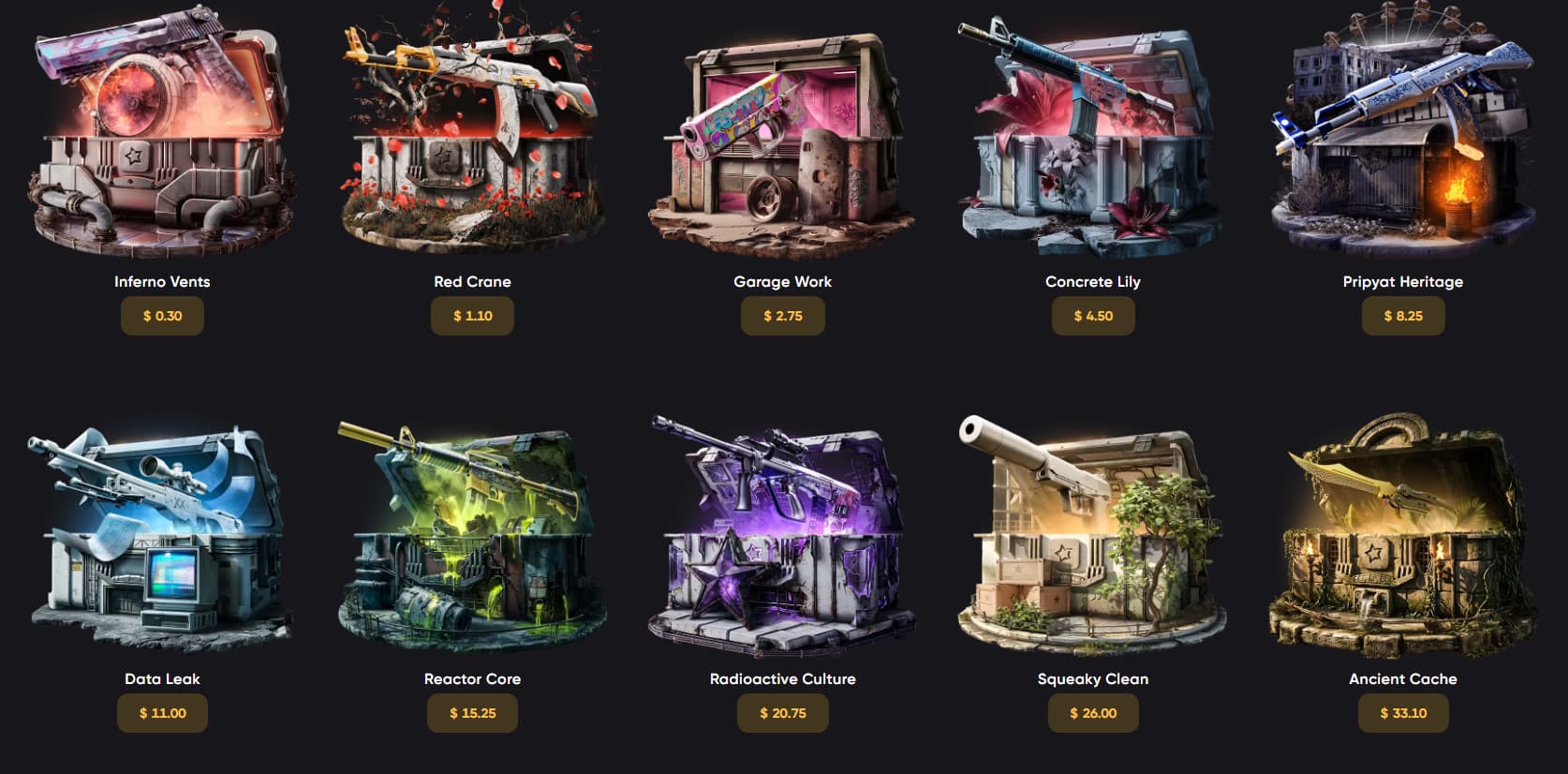
The case lineup covers everything from low-risk spins to high-ticket hunts, with more than 100 cases total and about 60+ sitting in the budget tier. Prices stretch from $0.10 up to several thousand depending on rarity and market shifts, so there’s room for both casual grinders and high rollers.

The catalog includes standard, premium, event, weapon-focused, color-based, knife, and glove cases, so players can chase specific AKsAWPs, gloves, knives, or themed collections instead of relying on one generic case pool.

For quick reference, here’s how some of the cheaper options stack up:

Case NamePriceNotable Drop
Consumer$0.10AUG Momentum
Industrial$0.15M4A1-S Mud-Spec
Desert Command$0.45M4A4 Buzz Kill
Spider’s Web$0.95Mac-10 Neon Rider
The Lake Collection$0.35Galil AR Sage Spray (FN)
Love & Lead$0.50MP9 Hydra
Ambush Stickers$0.90Sticker Dystopian Glaze

These are solid for testing luck without burning through balance too fast.

On the premium side, cases like Phoenix Rising, Oni Taiji, Toxic Surge, and Fade lean into higher-tier drops and themed pools. You’ll also find weapon-specific and color-based cases (AWP, M4A1-S, red skins, blue skins), plus dedicated knife and glove cases for players chasing standout inventory pieces.

Demo Mode, Price Filters and Case Preview Tools

Demo mode is the easiest way to scout a case before risking your balance. Hit DEMO on any case to spin it for free — just remember, those drops are simulated and can’t be kept or withdrawn. It’s mainly there to help you read the reel and understand how the case behaves.

When checking a case, focus on:

  • Full drop list and odds
  • Price vs potential returns
  • Theme and item pool

Filters like price range, themes, and Enough Balance make browsing quicker. Don’t get baited by a single high-tier knife — always check the full table to see what you’re actually rolling for.

Tested Cases
OpenStarsTestCases.png

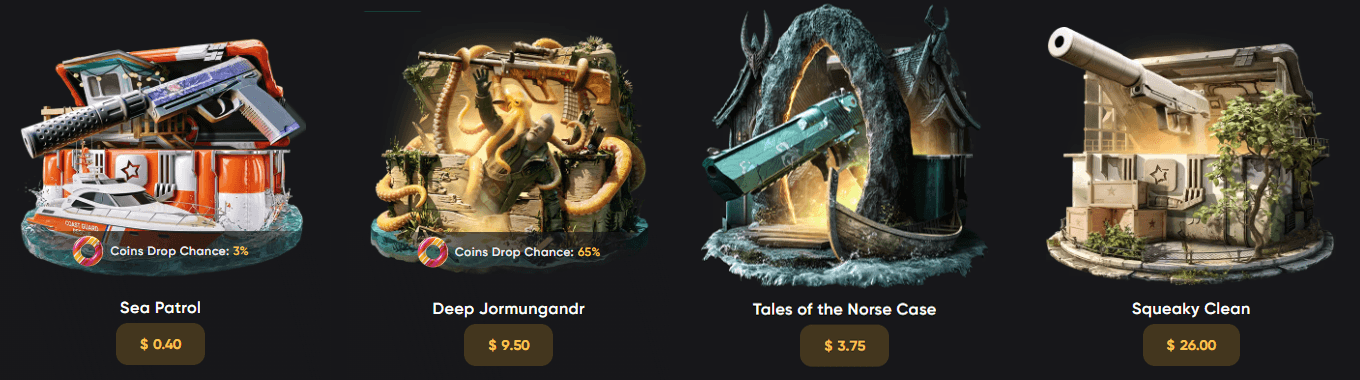
Our team’s budget was set to $400 so the test could be moved from cheaper cases to more expensive ones. It is a sensible way to check the platform without jumping straight into high-ticket spins. 

Each selected case was also tested in demo mode before or alongside paid openings. That helped compare the free preview experience with the real-money flow and made it easier to judge the animation, drop display, and overall case behavior.

Case TestedTypeTest ActionCost Checked
Sea PatrolEvent Case / Sea Drop3 paid openings plus demo check$0.40 each / $1.20 total
Tales of the Norse CasePremium Case3 paid openings plus demo check$3.75 each / $11.25 total
Deep JormungandrEvent Case / Sea Drop2 paid openings plus demo check$9.50 each / $19.00 total
Squeaky CleanCache Reborn1 paid opening plus demo check$26.00 total

The opening flow was fast and easy to follow. OpenStars uses CS2-style sounds and case animations that make the spins feel familiar without slowing down the process. One useful detail is that players can open up to five cases at the same time, which is convenient for testing cheaper cases or repeating openings quickly.

The “Quick Stop” feature also works well for users who do not want to wait through the full animation every time. It shows the result within a few seconds, making the case-opening experience more practical for longer sessions. Overall, the tested cases showed that OpenStars handles both budget and higher-cost openings smoothly, with demo mode adding a useful extra layer before spending real balance.
Our Choice
Caser
Caser
9.1/10
MYCSGO
MYCSGO
9.2/10
SkinRave
SkinRave
8.9/10

Game Modes Beyond Standard Case Opening

Case opening is the main loop: pick a case, pay, spin, and get the item’s value credited to your balance. That balance can be recycled into more openings, battles, upgrades, or used to withdraw skins you actually want.

It’s a straightforward system that lets you chase specific AKs, AWPs, gloves, or knives instead of stacking duplicates.

Case Battles

CaseBattlesOpenStars.png

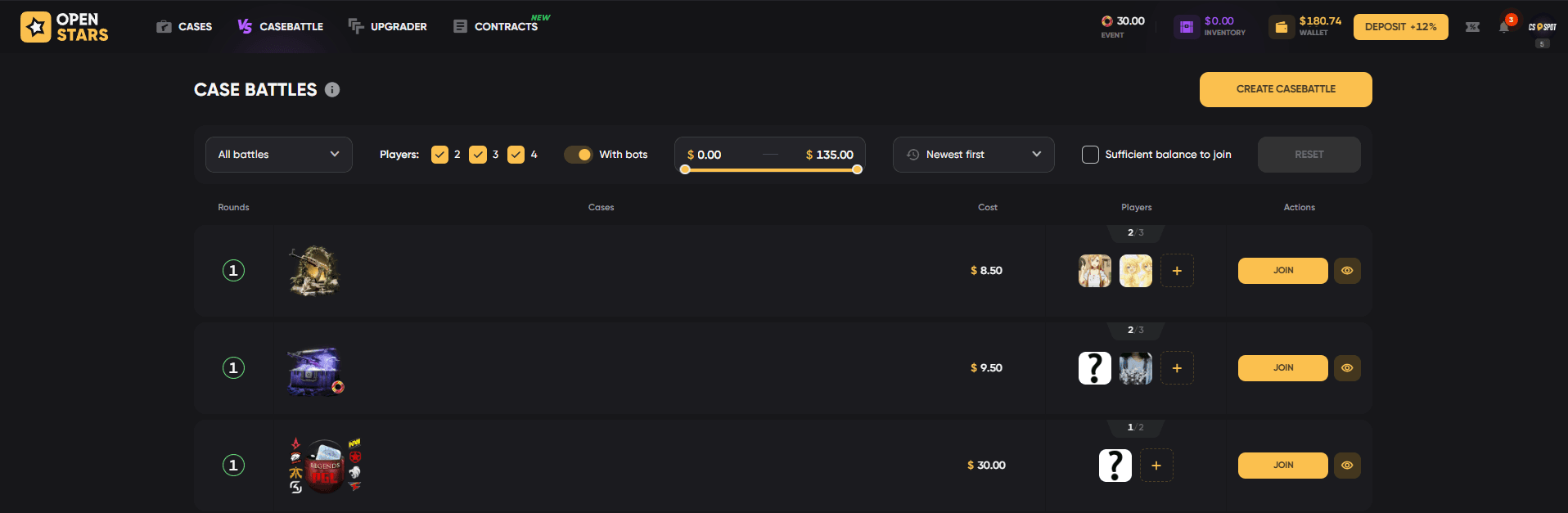
Case Battles are head-to-head openings where 2–4 players spin 1 or multiple chosen cases. In Classic mode, the highest total value takes the pot. Crazy mode flips it — lowest total wins, which adds a risky twist. You can jump into public lobbies or set up private battles with your own case lineup, player count, and animation speed. Once it starts, you’re locked in, so double-check the entry cost and rounds before committing.

Our test included both creating and joining battles at different price points, with join/start times measured from cheap to above-average battles:

Battle TestCase / PriceObserved Timing
Created cheap battleCrown of Candy / $1.00Players joined in about 1-2 minutes
Created mid-priced battleTrain AWP / $8.50Players joined in about 2-4 minutes
Joined mid-priced battleBattle cost up to $11.00Session started in about 1-2 minutes
Joined above-average battleBattle cost up to $21.00Session started in about 3-4 minutes

The results popup is clear, showing the winner, losers, total winnings, and player totals. Bot battles are useful when live opponents are not available, but the platform should keep bot behavior and fairness rules easy to understand, especially because bots can influence how quickly a battle starts.

Contracts and Upgrader

ContractsOpenStars.png

Contracts and Upgrader add more inventory-based risk to OpenStars, giving players ways to reuse skins instead of only selling them or opening more cases. Both tools are easy to access, but they should be treated carefully because every confirmed action can reduce value.

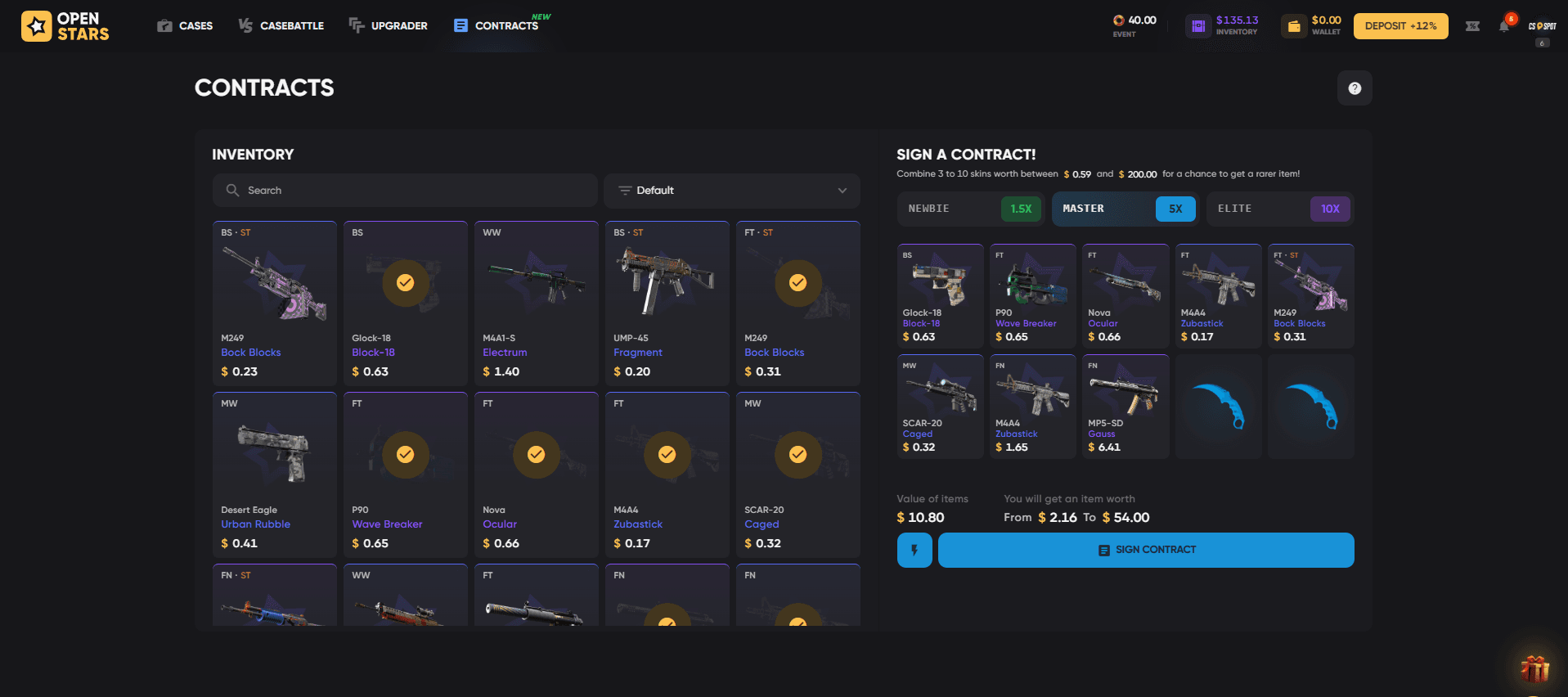
Contracts let you combine 3 to 10 skins into one randomized result. The feature feels close to CS2 trade-up logic, but it is more flexible because OpenStars allows contracts to start with only three skins instead of the usual ten.

  • Select eligible skins from your inventory.
  • Check the value requirements and estimated return range.
  • Choose a tier, such as Newbie at 1.5x, Master at 5x, and Elite at 10x.
  • Confirm with the Sign Contract button and view the result popup.
UpgradeOpenStars.png

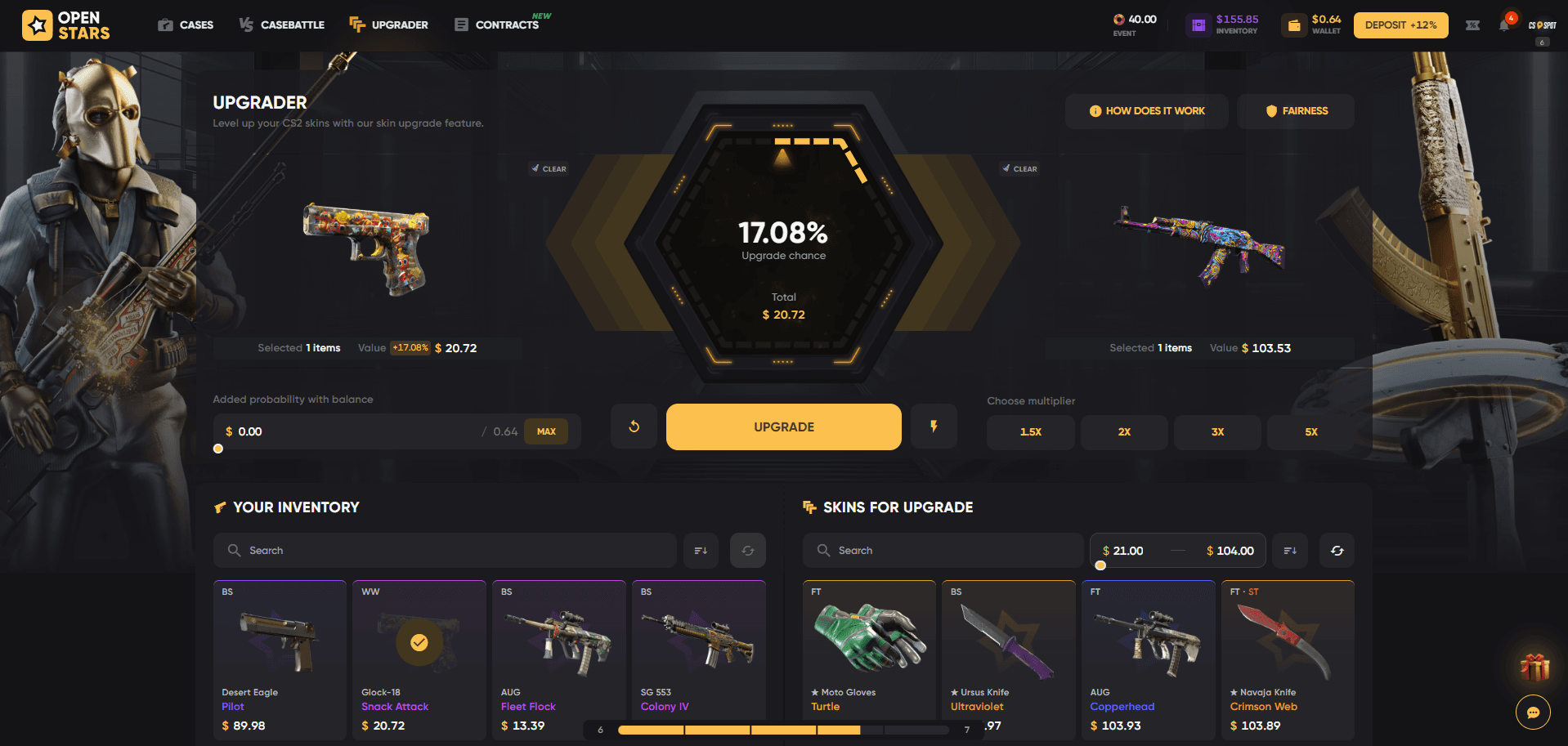
The Upgrader gives more control because you choose a target skin and see the chance before trying. Inventory items appear on the left, target skins on the right, with search, sorting, price filters, upgrade percentage, multipliers of 1.5x, 2x, 3x, and 5x, an option to add balance to improve probability, a How does it work button, a Fairness button, and success or failure result animations. You can also add balance to improve the probability, but the result can still fail.

  • Pick the skin you want to use.
  • Choose the target item and multiplier.
  • Review the success chance before confirming.
  • Watch the success or failure animation after the attempt.

Giveaways

Giveaways are a straightforward way to grab extra skins. Complete the listed requirements — usually simple tasks or participation — and you’re in. If you win, the item lands directly in your OpenStars inventory, ready to use or withdraw.

Provably Fair System and Drop Transparency

OpenStars uses a Provably Fair system based on a server seed, client seed, and random number. The site says this lets players verify game-round results and check randomness, while case pages show drop probabilities before opening. For players who care about skins and odds rather than just the reel animation, this is a useful habit: check the fairness section, read the item percentages, then decide whether the case price fits the possible outcome.

Bonuses, Free Cases, Events and Cashback

The rewards tab is stacked with ways to keep your balance moving without constant deposits. Here’s how it breaks down:

  1. Daily free cases – unlocked after signup, one spin every 24 hours, with 16 tiers total. Every five levels, your daily case gets upgraded with better drops.
  2. Weekly and rank rewards – progression is tied to wagering, so the more you play, the faster you climb and unlock better bonuses.
  3. Promo codes – split into Free Case, Deposit Bonus, and Free Balance types. The CSSPOT2026 code gives $0.5 plus a 10% deposit boost.
  4. Cashback – based on coins lost during play, with weekly payouts landing every Sunday at 00:00 UTC.
  5. VIP giveaways and legendary cases – extra chances for higher-tier skins if you stay active.

If you’re grinding consistently, claim your daily cases and time your deposit bonuses carefully, since level-based boosts can expire once a new one unlocks.

Affiliate Program and Referral Rewards

OpenStars also has an affiliate section where users can create a personal promo code and referral link and share it with new players. The base reward starts at 1% of referral spending, but the percentage grows as referred deposits increase, reaching up to 6% at the highest visible level. The page also shows total earnings, active referrals, current percent, and deposited referral funds, so tracking progress is easy. Earned affiliate funds can be withdrawn, though each withdrawal includes a 5% fee and processing may take up to 7 days.

Interface, Account Settings and Customer Support

InventoryOpenStars.png

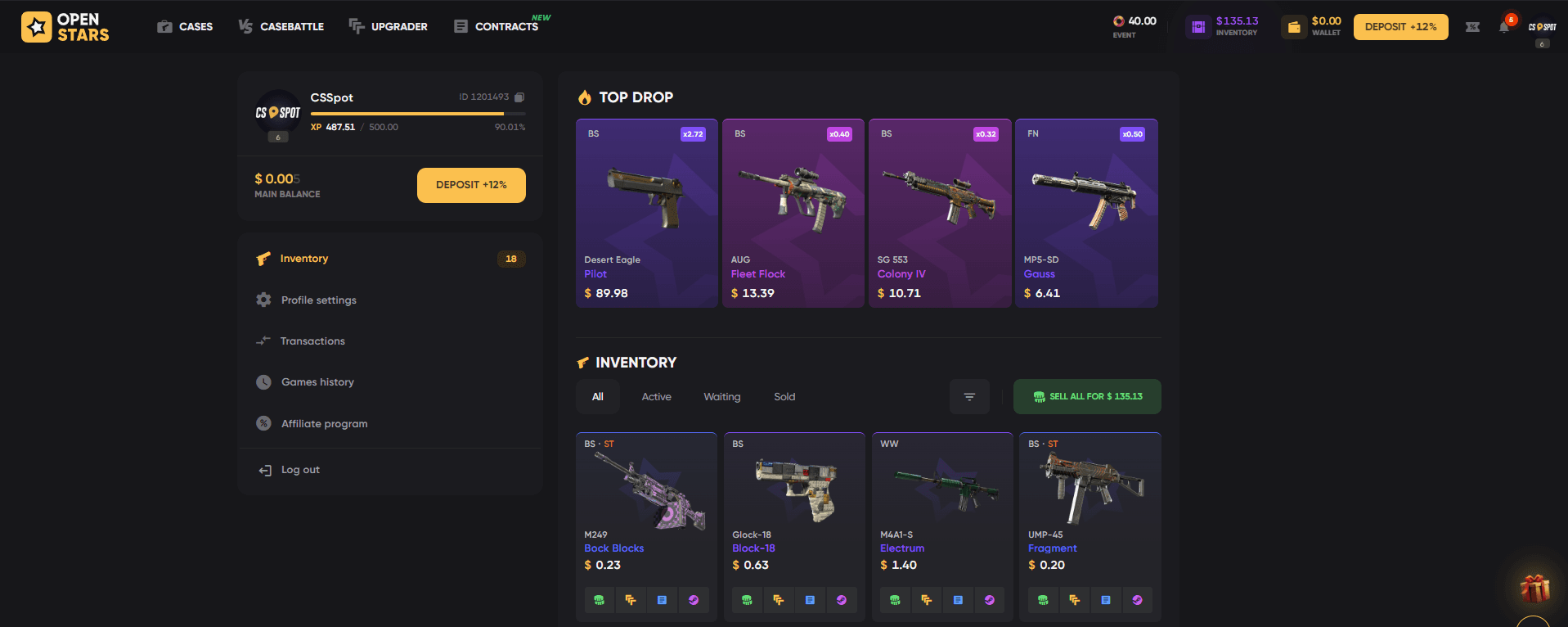
The interface is clean and quick to read, with access to cases, battles, events, rewards, giveaways, account settings, game history, blog, and support. Account settings cover email verification, password changes, two-factor authentication, hidden profile or game history, Steam Trade URL, language, currency, Streamer Mode, and in-game sound. Support is available through the Help Center and live chat, which is useful when a player needs help with payments, skins, battles, contracts, or account setup.

Deposits, Withdrawals, Steam Rules and Player Protections

OpenStars lets you fund your balance through cards, crypto, or skins, each with its own quick ruleset. Here’s a clean breakdown:

MethodKey RequirementsNotes
CardMin ~$2Usually instant or a few minutes
CryptoNetwork + min amountDouble-check address, no refunds
Skins$1 total, $0.05 per itemSteam holds can block trades

Withdrawals follow similar logic. You’ll need at least $2 deposited (or $5 if trading items), and that amount must be wagered first. A valid Steam Trade URL and active Steam Guard are mandatory. If you’ve used promo codes, you’ll need $10 in total deposits before unlocking skin withdrawals.

To avoid delays, keep your account verified, use the correct Trade URL, and stick to one account. It’s basic stuff, but skipping it can slow down your withdrawals when you finally hit a big drop.

Practical Test Summary: What Stood Out

The practical test confirmed several strengths that make OpenStars feel more complete than a simple case-opening site:

Positive PointHow It Appears in Use
Wide range of game modesCases, demo spins, battles, Upgrader, Contracts, events, giveaways, rewards, and inventory-based actions are connected.
Strong PvP focusBattles can be created, joined, watched, shared, recreated, filled with bots, or set up as private sessions.
Good filtering toolsThe case library, battle lobby, Upgrader, and Contracts include search, price sliders, player filters, bot filters, sorting, and balance filters.
Transparent cost displayBattle costs, case prices, skin values, upgrade chances, and contract value ranges are visible before confirmation.
Fairness elements are visibleClient seeds, Provably Fair links, and Fairness buttons appear across relevant modes.
Smooth inventory integrationOwned skins can be selected directly for Upgrader and Contracts with clear values and selection states.

The same test also showed several limitations and risks that should stay visible in any balanced review:

Risk or LimitationWhy It Matters
Interface can feel overloadedMany balances, filters, toggles, live drops, and promo elements compete for attention.
Risk-heavy modes are prominentFailed upgrades and low-value losses are possible, and the site makes repeated attempts very easy.
High-value targets may encourage overspendingExpensive skins and broad price filters can tempt users to chase rare drops beyond their budget.
Bot battles need clear transparencyBots can help fill battles, but users should understand how bot participation and fairness work.
Small text may reduce readabilityThe dark layout looks modern, but smaller labels and footer text can be hard to read on compact screens.

OpenStars Rating: Why Our Team Gives It 8.9/10

Our team rates OpenStars at 8.9/10 because it performs strongly in the areas that matter most: visible fairness tools, smooth case testing, clear skin withdrawal rules, and a wide feature set. The score is not perfect because risk-heavy modes, bot battles, and withdrawal conditions still require careful attention from users.

Rating CriteriaWeightScoreWhat We Checked
Fairness25%9.0Provably Fair tools, seed checks, visible odds
Withdrawal trustworthiness20%8.5Steam rules, wager terms, Trade URL requirements. Average withdrawal speed: 5-6 minutes.
Bonuses and their worth15%8.8Free cases, promo codes, cashback, rewards
Cases variety15%9.4Budget, premium, event, weapon, knife, glove cases
Interface/support15%9.0Navigation, filters, Help Center, live chat
Limits/user protection10%8.7Deposit rules, account checks, Steam Guard, 2FA

FAQ

  • Is OpenStars a fair CS2 case opening platform?

    OpenStars uses a Provably Fair system with server seed, client seed, and random number checks. Case pages also show drop probabilities, so players can review odds before opening cases.

  • Can you make profit on OpenStars?

    Profit is possible but never guaranteed. Case openings, battles, contracts, and upgrades all involve risk, and drops can be worth less than the price paid. It is better to treat the platform as entertainment.

  • What features does OpenStars offer?

    OpenStars offers CS2 case openings, demo spins, case battles, contracts, upgrader, giveaways, daily free cases, promo codes, cashback, Steam skin withdrawals, account settings, and live chat support.