


Market CSGO — Buying and Selling Counter-Strike Skins on the Marketplace
Market.CSGO
Market.CSGO
8.6/10
Payment methods
Cards
Cards
Cryptocurrency
Cryptocurrency
SkinPay
SkinPay
ApplePay
ApplePay
MIR
MIR
SBP
SBP
market-logo-blue-3.png

Market CSGO is a third-party trading marketplace where CS2 players can buy and sell skinsknives, gloves, stickers, and other in-game items through Steam trades.

For players and skin traders, third-party marketplaces can offer better value than the Steam Community Market, with prices often being lower and the option to withdraw funds from the platform to your own account.

We tested all of CSGO Market's main features, including buying and selling skins as well as withdrawing funds. Below is a full breakdown of what the platform has to offer.

Skin Categories and Marketplace Navigation
Categories.png

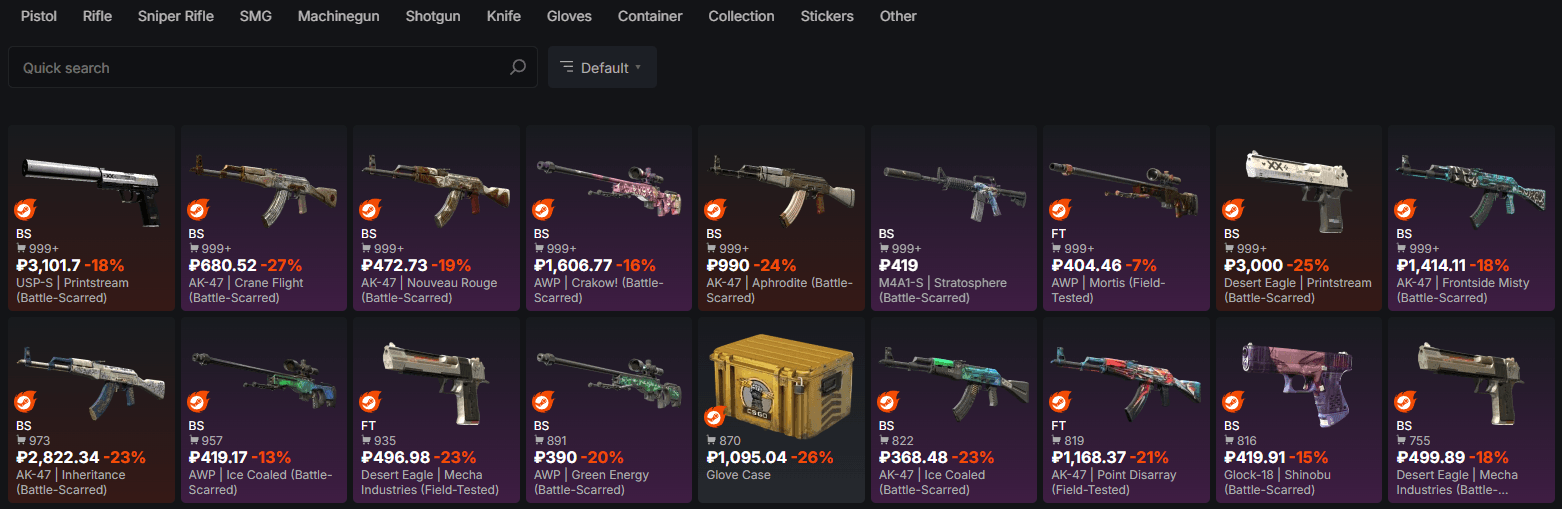
When entering the site, users first see the full skin catalog, with a filter menu on the left, weapon categories, and a search bar at the top.

On each skin's page, users can select a specific wear level, set up auto-buy, enable notifications to make it easier to track new listings, and choose skins by pattern from the available listings on the right.

There are three ways to see what a skin with a specific float and pattern looks like in-game:

  1. 3D View — Inspect a 3D model of the skin directly in your browser.
  2. Screenshot — The platform shows screenshots of the skin from both sides along with its pattern, float, and wear.
  3. Inspect on Server — The platform opens Counter-Strike 2, provided Steam is running and the game is installed, and sends the user to a separate server where the skin can be inspected in-game.

Weapon Categories

The weapon menu includes all item categories available in CS2:

  • By weapon: PistolsRifles, Sniper Rifles, SMGsMachine Guns, Shotguns, Knives, Gloves;
  • Containers: Cases, Collections;
  • Other: Stickers, Charms, Agents, Capsule and Case Keys, Patches, Graffiti, Music Kits, and Passes.

Each major category also has a submenu with more specific weapons to choose from.

Filters and Price Comparison Tools

Market.CSGO offers plenty of filters, ranging from standard options such as skin rarity and wear to searches for specific stickers already applied to a skin. Items can also be filtered by:

FilterDescription
PriceSet a price range from one specific amount to another.
Sales per weekThe number of times the skin was sold on Market CSGO during the week.
Cheaper than SteamMarks skins that are priced a certain percentage lower than on the Steam Community Market.
Alfaskins onlyShows only Alfaskins in search results. These are digital counterparts of Steam skins that are not directly tied to a trade, which protects them from trade bans. An Alfaskin can be withdrawn to the inventory at any time.
PhasesPhases for Doppler and Gamma Doppler skins. Users can select Phases 1 through 4, as well as Emerald, Sapphire, Ruby, and Black Pearl.
CategoryRegular, StatTrak™, Souvenir, Knife/Gloves (★), and whether a Charm or Sticker is present.
FloatSelect skins within a specific float range.
ColorDisplay skins with a specific dominant color.
Sticker SearchThis search bar allows users to find skins with specific stickers already applied to them.

In our view, the marketplace has a fairly extensive selection of filters that covers almost every major need.


Our Choice
Chicken.GG
Chicken.GG
9.3/10
4 games
Cards
Cryptocurrency
Gift Cards
+2
CS2SKIN
CS2SKIN
9.5/10
7 games
Cryptocurrency
Cards
ApplePay
+2
CSSPOT
+100% to Deposit
until 21.09.2026
MYCSGO
MYCSGO
9.2/10
6 games
ApplePay
Cards
MIR
+3

How Buying and Selling Works on Market.CSGO

Market.CSGO uses an escrow system: the buyer's money is held during the transaction and returned if the skin is not received. Before you start trading, check the following:

  1. You are logged into the site through your Steam account.
  2. Your trade URL is entered in the site's settings (You can find out how to find it on this wiki page).
  3. Make sure there is no trade ban on your account or on the skin you want to sell.

Only after everything has been checked and meets the requirements should you start trading.

How You Can Buy and Sell Skins

The platform can be used through a browser on all platforms, as well as through desktop apps for Mac, Windows, and Linux, mobile apps for iOS and Android, and browser extensions for Firefox and Chrome.

It is important to note that during our tests, we were only able to use the marketplace after installing the browser extension. Without it, the marketplace would not connect to the inventory, meaning we could not sell skins.

Features for sellers:

  • Quick Sale — Lets users instantly sell a skin at a price set by the marketplace. This option is usually less profitable than listing an item yourself, but the money is credited immediately and can be used to buy another skin or withdrawn using a convenient method, with withdrawals becoming available eight days after the sale.
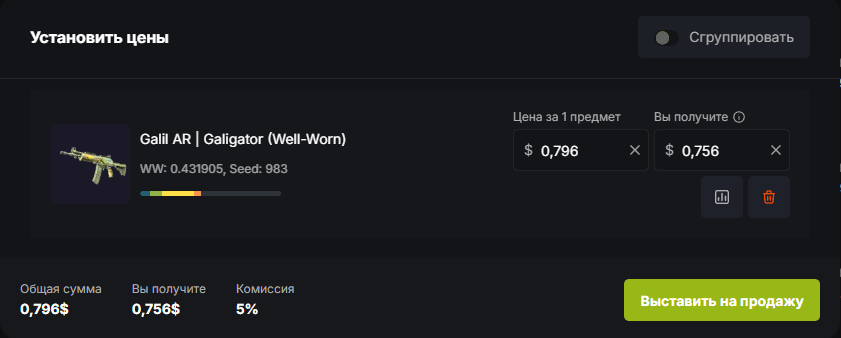
  • Regular Sale — The selling window shows all available skins. Users can select one or several items, set their prices, and list them for sale. The commission is calculated automatically.

Features for buyers:

  • Regular Purchase — Users can add several skins to their cart and buy them at the same time or purchase a single item.
  • Auto-Buy — On a specific skin's page, users can set a maximum price. Once the item reaches that price, it will be purchased automatically. Up to 100 skins can be set up for auto-buy this way.

How We Tested the Marketplace

selling.png

Our team tested the marketplace using skins across different price ranges and levels of popularity among users.

We listed an M4A4 | Temukau (Battle-Scarred) for $26.73, as well as a Galil AR | Galigator (Well-Worn) for $0.79. The prices were set based on listings from other sellers. During our testing, however, only the Galil AR was successfully sold, while the M4A4 failed to attract any buyers.

The selling process was quick and convenient. Market CSGO automatically generated the trade offer, and we were able to view the buyer’s profile beforehand to double-check everything before confirming the trade through the Steam mobile app.

The purchasing process was just as smooth. We bought several skins at once using the shopping cart:

The trade offer from the seller arrived quickly, and so did the confirmation.

It is also worth noting that all of the skins, with the exception of the Galil AR | Galigator, were bought and sold at prices lower than on Steam. Since item prices are constantly changing, it is very convenient to keep an eye out for good deals when buying. At the same time, trying to sell an item at the Steam market price can take considerably longer.

Fees, Payment Methods, and Withdrawal Options

Deposit.png

Market.CSGO only charges a commission when an item is listed for sale. There is no commission when purchasing an item.

Buyers may only have to pay a fee when adding funds to their balance if their chosen deposit method includes one.

SectionWhat Users Need to Know
Seller fee5% when listing an item for sale
Buyer fee0% when purchasing items
Withdrawal feeDepends on the method, amount, and the user's country
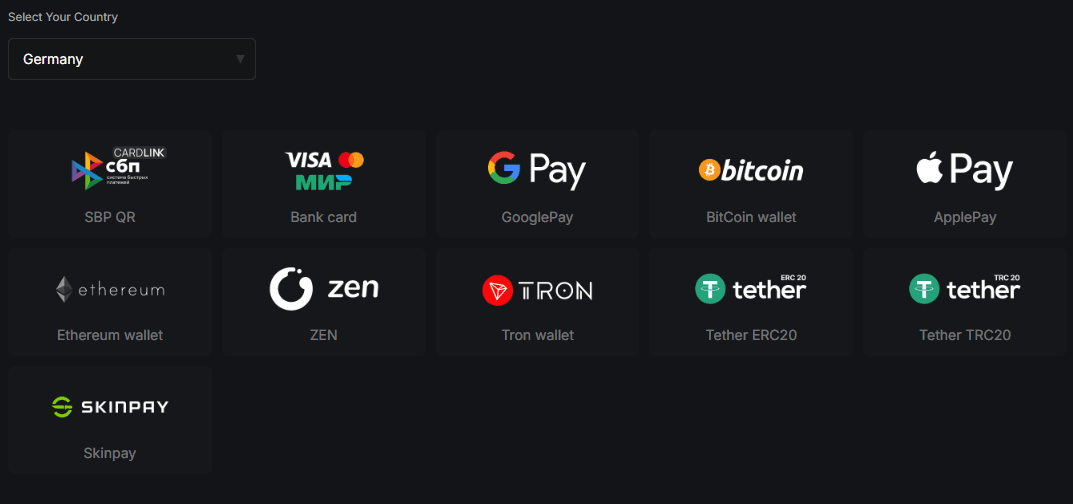
Deposit methodsVisa, Mastercard, MIR, Google Pay, Apple Pay, Ethereum, Tron, Tether ERC20, Tether TRC20, Bitcoin, SkinPay
Withdrawal optionsVisa, Mastercard, MIR, PayPal, SEPA, Ethereum, Tron, Tether ERC20, Tether TRC20, Bitcoin, Steam
Waiting timeDepends on the selected deposit or withdrawal method.

Available deposit methods differ depending on the user's country.

After selling an item, the money can be withdrawn after eight days. Unused funds on the balance can be withdrawn five days after they were added to the account.

In our case, the funds were added to the balance instantly after making a Mastercard deposit, while a withdrawal to Mastercard took nine minutes.

Safety and User Protection on Market CSGO

In our case, we did not find any obvious security issues. All transactions were protected, while item exchange was initiated from our account, and when buying, the exchange came from the seller. If you run into a problem, support is always available through a convenient ticket system for any type of issue. Before contacting support, make sure to save your trade IDs, payment receipts, and screenshots.

The platform also warns users not to share their trade URL with outsiders and to always check the URL of any trade sent to them, the contents of the trade, and the account it came from.

Why Market.CSGO Gets 8.6/10

Market.CSGO earns an 8.6/10 thanks to its protected escrow transaction system, large selection of items and filters, useful buying and selling tools, zero buyer fees, and wide range of payment methods. We did not encounter any obvious security issues during testing, while our Mastercard withdrawal took just nine minutes. The score is slightly lowered by the 5% seller fee, withdrawal waiting periods, and the need to install a browser extension to access the inventory during our test.

Rating CriterionWeightScoreReasoning
Trade security and user protection25%9.0/10Transactions use escrow. We did not encounter any security issues during testing, while a ticket system is available for disputes.
Liquidity and sale speed20%8.4/10Both regular and quick sales are available. Quick Sale provides the funds immediately, although the price is less favorable.
Prices, fees, and overall value20%8.6/10Buyers do not pay a fee when purchasing items, while the seller fee is 5%. The catalog also lets users specifically find items that are cheaper than on Steam.
Skin Selection15%9.0/10The catalog covers the full CS2 item selection with filters for float, phases, stickers, price, and other parameters, along with browser-based 3D viewing and server inspection.
Deposits and Withdrawals10%8.0/10Bank cards, cryptocurrencies, and other methods are available. In our test, a Mastercard withdrawal took nine minutes, but funds from sold items can only be withdrawn after eight days, while unused funds have a five-day waiting period.
Interface and Support10%8.0/10The marketplace is available through browsers, apps, and extensions, while support works through a ticket system. However, during our test, we could not connect the inventory or sell skins without the browser extension.

FAQ

  • Is Market.CSGO Fair?

    Market.CSGO uses escrow: the buyer's money is held by the platform until the transaction is completed and returned if the item is not received. Skin trades take place directly between buyers and sellers.

  • Is Market.CSGO Worth Using?

    Buyers do not pay a fee when purchasing skins, while prices are often lower than on Steam. Sellers pay a 5% fee. Quick Sale is less profitable than listing an item yourself, but the seller receives the funds immediately.

  • What Features Does Market.CSGO Have?

    The marketplace offers advanced filters, sticker search, 3D inspection, and server-based skin inspection. Users can also set up auto-buy and notifications, purchase several items at once, and choose between Quick Sale and Regular Sale.